> ## Documentation Index
> Fetch the complete documentation index at: https://docs-staging-feat-session-delegation.mintlify.site/llms.txt
> Use this file to discover all available pages before exploring further.

> Learn how to configure an update policy form using Forms for Actions for users to review and accept new terms of service or consent updates.

# Use Cases: Configure an update policy form using Forms

<Card title="Before you start">
  1. Create a [Machine-to-Machine Application](/docs/get-started/auth0-overview/create-applications/machine-to-machine-apps) with the following scopes enabled:

  * `read:users`
  * `update:users`
  * `create:users`
  * `read:users_app_metadata`
  * `update:users_app_metadata`
  * `create:users_app_metadata`

  2. Add a [Vault connection](/docs/customize/forms/vault) using the M2M application credentials.
</Card>

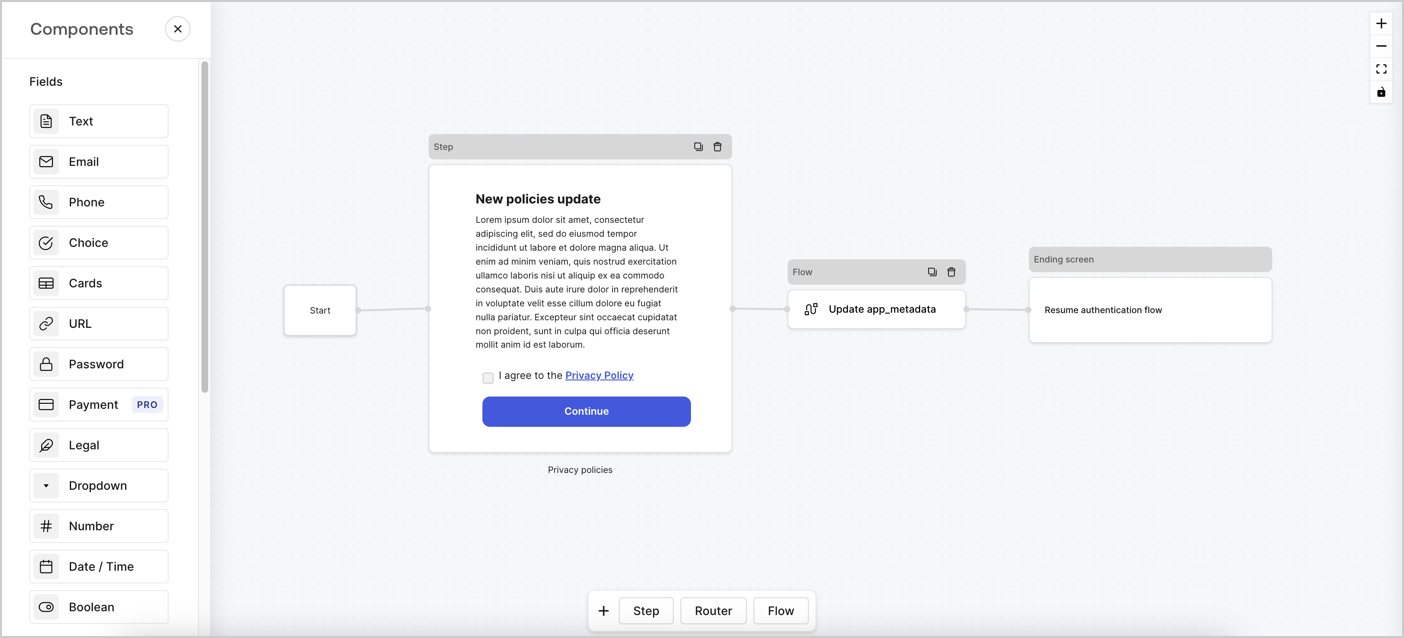
Forms for Actions allows you to create custom privacy policies flows and store the consent under the `app_metadata` object.
<Frame>
  <img src="https://mintcdn.com/docs-staging-feat-session-delegation/P4JoQpw9jeamrzUk/docs/images/cdy7uua7fh8z/6i68dMvHDTijfRmSgN1x8Q/ad900e7d4c0fb34645921435472b8684/privavy-policy-form.png?fit=max&auto=format&n=P4JoQpw9jeamrzUk&q=85&s=19b1396314b8b0e8c94d59d6fa5ee07d" alt="Dashboard > Actions > Forms > Privacy policy use case" data-og-width="1404" width="1404" data-og-height="638" height="638" data-path="docs/images/cdy7uua7fh8z/6i68dMvHDTijfRmSgN1x8Q/ad900e7d4c0fb34645921435472b8684/privavy-policy-form.png" data-optimize="true" data-opv="3" srcset="https://mintcdn.com/docs-staging-feat-session-delegation/P4JoQpw9jeamrzUk/docs/images/cdy7uua7fh8z/6i68dMvHDTijfRmSgN1x8Q/ad900e7d4c0fb34645921435472b8684/privavy-policy-form.png?w=280&fit=max&auto=format&n=P4JoQpw9jeamrzUk&q=85&s=645a81dcb37879d4249ea611d638af48 280w, https://mintcdn.com/docs-staging-feat-session-delegation/P4JoQpw9jeamrzUk/docs/images/cdy7uua7fh8z/6i68dMvHDTijfRmSgN1x8Q/ad900e7d4c0fb34645921435472b8684/privavy-policy-form.png?w=560&fit=max&auto=format&n=P4JoQpw9jeamrzUk&q=85&s=22bd4d1064caaec258d45101dd70c3ad 560w, https://mintcdn.com/docs-staging-feat-session-delegation/P4JoQpw9jeamrzUk/docs/images/cdy7uua7fh8z/6i68dMvHDTijfRmSgN1x8Q/ad900e7d4c0fb34645921435472b8684/privavy-policy-form.png?w=840&fit=max&auto=format&n=P4JoQpw9jeamrzUk&q=85&s=5415ff93c81c78dee0fafce10825c43e 840w, https://mintcdn.com/docs-staging-feat-session-delegation/P4JoQpw9jeamrzUk/docs/images/cdy7uua7fh8z/6i68dMvHDTijfRmSgN1x8Q/ad900e7d4c0fb34645921435472b8684/privavy-policy-form.png?w=1100&fit=max&auto=format&n=P4JoQpw9jeamrzUk&q=85&s=88379daf144870ad2bf7b4f0be3235bd 1100w, https://mintcdn.com/docs-staging-feat-session-delegation/P4JoQpw9jeamrzUk/docs/images/cdy7uua7fh8z/6i68dMvHDTijfRmSgN1x8Q/ad900e7d4c0fb34645921435472b8684/privavy-policy-form.png?w=1650&fit=max&auto=format&n=P4JoQpw9jeamrzUk&q=85&s=8e8d640713c971b9f75db940dd1ce74f 1650w, https://mintcdn.com/docs-staging-feat-session-delegation/P4JoQpw9jeamrzUk/docs/images/cdy7uua7fh8z/6i68dMvHDTijfRmSgN1x8Q/ad900e7d4c0fb34645921435472b8684/privavy-policy-form.png?w=2500&fit=max&auto=format&n=P4JoQpw9jeamrzUk&q=85&s=16b43cb1fba047d4226a1c80396fa8c2 2500w" />
</Frame>

The sections below outline how you can create an Update Policy form using nodes and flows, along with steps for adding your form to a [Post Login](/docs/customize/actions/explore-triggers/signup-and-login-triggers/login-trigger) Action.

## Create a form from scratch

Follow these steps to create a form to gather information:

1. Open the Form editor by selecting **Auth0 Dashboard > Actions > Forms.**
2. Select **Create Form** > **Start from scratch**.

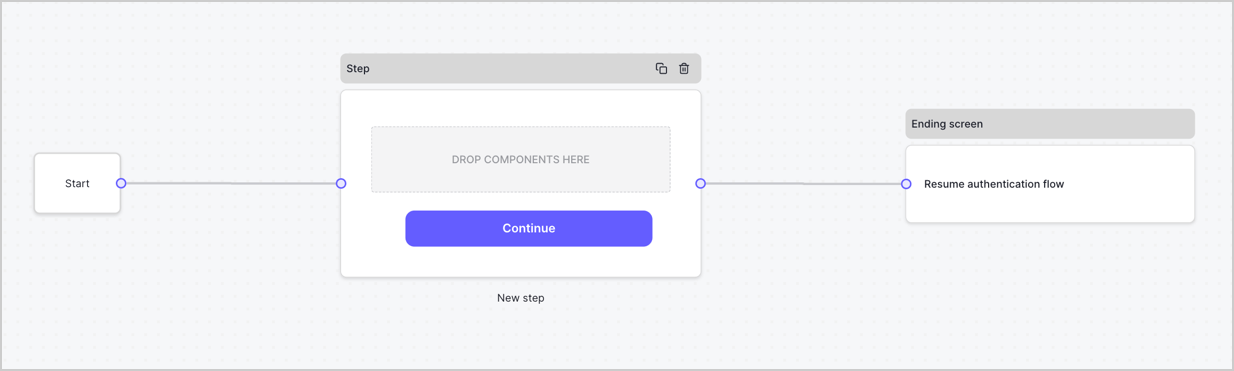
By default, a new form contains a Start node, a Step node, and an Ending screen node.
<Frame>
  <img src="https://mintcdn.com/docs-staging-feat-session-delegation/hkHvz9yko2XWa8mS/docs/images/cdy7uua7fh8z/2TZ9jSjgEcARFpULI6hz4R/a4319a1bd482f2ee5cc23100fdb2f42c/New-form-Forms-for-action-use-case.png?fit=max&auto=format&n=hkHvz9yko2XWa8mS&q=85&s=75cece8c717efd10dcfa1dfaeed8bdb4" alt="Dashboard > Forms > Use Cases > Form" data-og-width="1234" width="1234" data-og-height="371" height="371" data-path="docs/images/cdy7uua7fh8z/2TZ9jSjgEcARFpULI6hz4R/a4319a1bd482f2ee5cc23100fdb2f42c/New-form-Forms-for-action-use-case.png" data-optimize="true" data-opv="3" srcset="https://mintcdn.com/docs-staging-feat-session-delegation/hkHvz9yko2XWa8mS/docs/images/cdy7uua7fh8z/2TZ9jSjgEcARFpULI6hz4R/a4319a1bd482f2ee5cc23100fdb2f42c/New-form-Forms-for-action-use-case.png?w=280&fit=max&auto=format&n=hkHvz9yko2XWa8mS&q=85&s=b1a66f88ac4d00d223b582c7bece85ab 280w, https://mintcdn.com/docs-staging-feat-session-delegation/hkHvz9yko2XWa8mS/docs/images/cdy7uua7fh8z/2TZ9jSjgEcARFpULI6hz4R/a4319a1bd482f2ee5cc23100fdb2f42c/New-form-Forms-for-action-use-case.png?w=560&fit=max&auto=format&n=hkHvz9yko2XWa8mS&q=85&s=fe5f826e7f0ced0811780d7596ffda56 560w, https://mintcdn.com/docs-staging-feat-session-delegation/hkHvz9yko2XWa8mS/docs/images/cdy7uua7fh8z/2TZ9jSjgEcARFpULI6hz4R/a4319a1bd482f2ee5cc23100fdb2f42c/New-form-Forms-for-action-use-case.png?w=840&fit=max&auto=format&n=hkHvz9yko2XWa8mS&q=85&s=1a1e6ff18596e36b801f111be0029479 840w, https://mintcdn.com/docs-staging-feat-session-delegation/hkHvz9yko2XWa8mS/docs/images/cdy7uua7fh8z/2TZ9jSjgEcARFpULI6hz4R/a4319a1bd482f2ee5cc23100fdb2f42c/New-form-Forms-for-action-use-case.png?w=1100&fit=max&auto=format&n=hkHvz9yko2XWa8mS&q=85&s=c69cc104e7f6eb3ca2c98a2ef8c7e40e 1100w, https://mintcdn.com/docs-staging-feat-session-delegation/hkHvz9yko2XWa8mS/docs/images/cdy7uua7fh8z/2TZ9jSjgEcARFpULI6hz4R/a4319a1bd482f2ee5cc23100fdb2f42c/New-form-Forms-for-action-use-case.png?w=1650&fit=max&auto=format&n=hkHvz9yko2XWa8mS&q=85&s=e95ef3ed85e6be9a258d6bfeafc34916 1650w, https://mintcdn.com/docs-staging-feat-session-delegation/hkHvz9yko2XWa8mS/docs/images/cdy7uua7fh8z/2TZ9jSjgEcARFpULI6hz4R/a4319a1bd482f2ee5cc23100fdb2f42c/New-form-Forms-for-action-use-case.png?w=2500&fit=max&auto=format&n=hkHvz9yko2XWa8mS&q=85&s=f59e2748d723f5bb67aa93fd3dfb50d7 2500w" />
</Frame>

### Configure the Step node

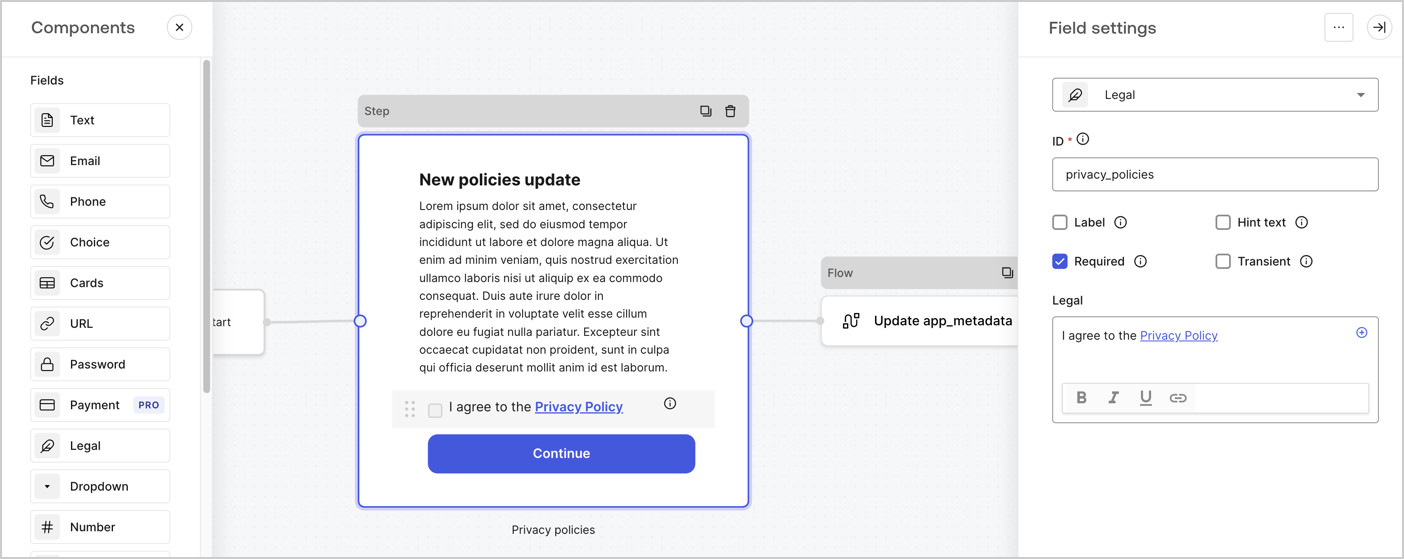
The Step node is the graphical interface visible to users. Add [Fields](/docs/customize/forms/nodes-and-components) to the Step node to collect the new agreement acceptance value by following these steps:

1. Drag a **Rich text** field from the **Components menu** into the **Step** node.

   * **Rich text**: Enter a description of your privacy policies updates.
   * Select **Save**.
2. Drag a **Legal** field into the **Step** node.

   * **ID**: Enter `privacy_policies`.
   * **Required**: Enable the checkbox.
   * **Legal**: Enter `I agree to the Privacy Policy`.
   * Select **Save**.
3. Select **Publish** to save.
<Frame>
  <img src="https://mintcdn.com/docs-staging-feat-session-delegation/MbOp8CcfMKlglpsw/docs/images/cdy7uua7fh8z/59zFFjQjAnjogkc2QGIqqJ/0ad66b1b636544122aa4e65968b76c2c/privacy-policy-step-node.png?fit=max&auto=format&n=MbOp8CcfMKlglpsw&q=85&s=b4badcb83de296c7cf44cee3a11eb770" alt="Dashboard > Actions > Forms > Use case privacy policy step node" data-og-width="1404" width="1404" data-og-height="559" height="559" data-path="docs/images/cdy7uua7fh8z/59zFFjQjAnjogkc2QGIqqJ/0ad66b1b636544122aa4e65968b76c2c/privacy-policy-step-node.png" data-optimize="true" data-opv="3" srcset="https://mintcdn.com/docs-staging-feat-session-delegation/MbOp8CcfMKlglpsw/docs/images/cdy7uua7fh8z/59zFFjQjAnjogkc2QGIqqJ/0ad66b1b636544122aa4e65968b76c2c/privacy-policy-step-node.png?w=280&fit=max&auto=format&n=MbOp8CcfMKlglpsw&q=85&s=51c3bcdac8fe192ddd5aa25b4b673039 280w, https://mintcdn.com/docs-staging-feat-session-delegation/MbOp8CcfMKlglpsw/docs/images/cdy7uua7fh8z/59zFFjQjAnjogkc2QGIqqJ/0ad66b1b636544122aa4e65968b76c2c/privacy-policy-step-node.png?w=560&fit=max&auto=format&n=MbOp8CcfMKlglpsw&q=85&s=056bb4c476fbf3202f4d3953f7a023da 560w, https://mintcdn.com/docs-staging-feat-session-delegation/MbOp8CcfMKlglpsw/docs/images/cdy7uua7fh8z/59zFFjQjAnjogkc2QGIqqJ/0ad66b1b636544122aa4e65968b76c2c/privacy-policy-step-node.png?w=840&fit=max&auto=format&n=MbOp8CcfMKlglpsw&q=85&s=1782b3f2d6b120f2d76398f407c0cc02 840w, https://mintcdn.com/docs-staging-feat-session-delegation/MbOp8CcfMKlglpsw/docs/images/cdy7uua7fh8z/59zFFjQjAnjogkc2QGIqqJ/0ad66b1b636544122aa4e65968b76c2c/privacy-policy-step-node.png?w=1100&fit=max&auto=format&n=MbOp8CcfMKlglpsw&q=85&s=b5658d552fa85cc33d5bb2abe448e857 1100w, https://mintcdn.com/docs-staging-feat-session-delegation/MbOp8CcfMKlglpsw/docs/images/cdy7uua7fh8z/59zFFjQjAnjogkc2QGIqqJ/0ad66b1b636544122aa4e65968b76c2c/privacy-policy-step-node.png?w=1650&fit=max&auto=format&n=MbOp8CcfMKlglpsw&q=85&s=e394341d117d270d5177b338e5428bce 1650w, https://mintcdn.com/docs-staging-feat-session-delegation/MbOp8CcfMKlglpsw/docs/images/cdy7uua7fh8z/59zFFjQjAnjogkc2QGIqqJ/0ad66b1b636544122aa4e65968b76c2c/privacy-policy-step-node.png?w=2500&fit=max&auto=format&n=MbOp8CcfMKlglpsw&q=85&s=b588d2f6eed7e6458c9ab83ec1821938 2500w" />
</Frame>

### Configure the Flow node

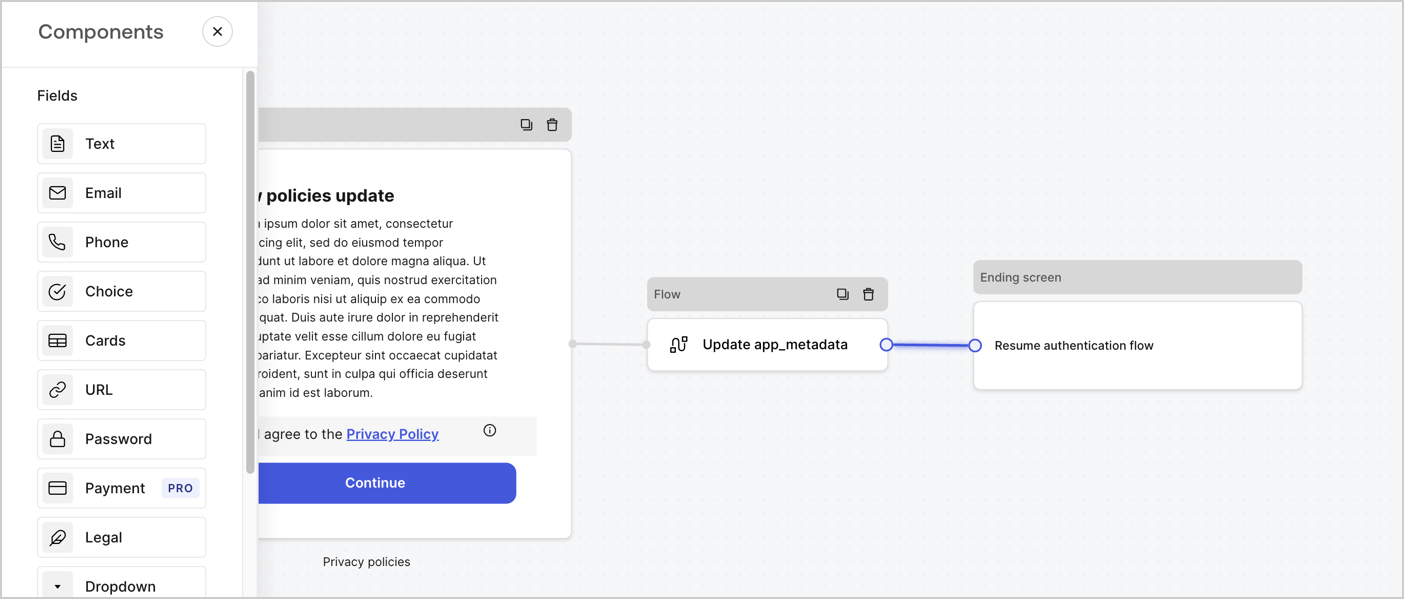
Add a **Flow** node after the **Step** node to update the `app_metadata` and resume the authentication flow by following these steps:

1. Select **Flow** from the bottom of the Form editor.
2. Remove the existing link between the **Step** and **Ending Screen** nodes.
3. Select the new **Flow** > **Click to add a flow** > **Create a new flow.**

   * Enter `Update app_metadata` in the **Name** field.
   * Select **Create**.
   * Select **Save**.
4. Link the **Flow** node to the **Step** and **Ending Screen** nodes as pictured below.
5. Select **Publish** to save.
<Frame>
  <img src="https://mintcdn.com/docs-staging-feat-session-delegation/P4JoQpw9jeamrzUk/docs/images/cdy7uua7fh8z/6YIkzm7SrpM9LW76AXuRzh/353c518fe82bbaa440836da1d83596d6/link-policies.png?fit=max&auto=format&n=P4JoQpw9jeamrzUk&q=85&s=256c00308de59d2e172c50662c697731" alt="Dashboard > Actions > Forms > Form" data-og-width="1404" width="1404" data-og-height="599" height="599" data-path="docs/images/cdy7uua7fh8z/6YIkzm7SrpM9LW76AXuRzh/353c518fe82bbaa440836da1d83596d6/link-policies.png" data-optimize="true" data-opv="3" srcset="https://mintcdn.com/docs-staging-feat-session-delegation/P4JoQpw9jeamrzUk/docs/images/cdy7uua7fh8z/6YIkzm7SrpM9LW76AXuRzh/353c518fe82bbaa440836da1d83596d6/link-policies.png?w=280&fit=max&auto=format&n=P4JoQpw9jeamrzUk&q=85&s=23bf719bb3cbec1feb892aebdd39ca0a 280w, https://mintcdn.com/docs-staging-feat-session-delegation/P4JoQpw9jeamrzUk/docs/images/cdy7uua7fh8z/6YIkzm7SrpM9LW76AXuRzh/353c518fe82bbaa440836da1d83596d6/link-policies.png?w=560&fit=max&auto=format&n=P4JoQpw9jeamrzUk&q=85&s=e325654ddf4b84ce2c1509efcda9b436 560w, https://mintcdn.com/docs-staging-feat-session-delegation/P4JoQpw9jeamrzUk/docs/images/cdy7uua7fh8z/6YIkzm7SrpM9LW76AXuRzh/353c518fe82bbaa440836da1d83596d6/link-policies.png?w=840&fit=max&auto=format&n=P4JoQpw9jeamrzUk&q=85&s=bc68821ff4244c726d1227d94d9fe4f1 840w, https://mintcdn.com/docs-staging-feat-session-delegation/P4JoQpw9jeamrzUk/docs/images/cdy7uua7fh8z/6YIkzm7SrpM9LW76AXuRzh/353c518fe82bbaa440836da1d83596d6/link-policies.png?w=1100&fit=max&auto=format&n=P4JoQpw9jeamrzUk&q=85&s=938474dec164306cd4bf78f16adc99ee 1100w, https://mintcdn.com/docs-staging-feat-session-delegation/P4JoQpw9jeamrzUk/docs/images/cdy7uua7fh8z/6YIkzm7SrpM9LW76AXuRzh/353c518fe82bbaa440836da1d83596d6/link-policies.png?w=1650&fit=max&auto=format&n=P4JoQpw9jeamrzUk&q=85&s=e10f8493c73a96ad77398f4cd76179f5 1650w, https://mintcdn.com/docs-staging-feat-session-delegation/P4JoQpw9jeamrzUk/docs/images/cdy7uua7fh8z/6YIkzm7SrpM9LW76AXuRzh/353c518fe82bbaa440836da1d83596d6/link-policies.png?w=2500&fit=max&auto=format&n=P4JoQpw9jeamrzUk&q=85&s=736ded4e5ffc9e610d155ed94d2fee9a 2500w" />
</Frame>

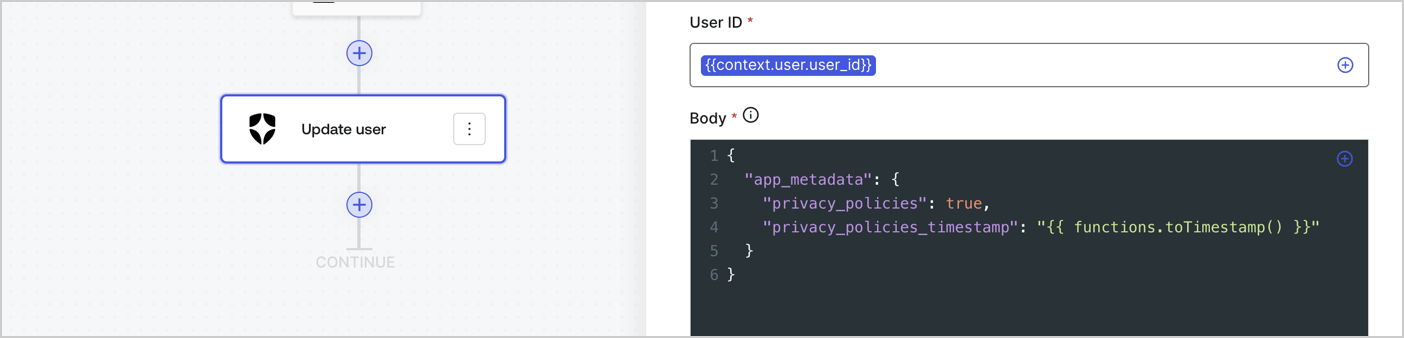
Add an Auth0 Update user action to the flow by following these steps:

1. Select the **Flow** **Update app\_metadata** > **Edit flow** to open the Flow editor in a new tab.
2. Below the StartAction, select the **+** icon to add an **Update user** action. Complete the fields below, then select **Save** to continue.

   * **Connection**: Select from the dropdown the Vault connection to your M2M application.

   * **User ID**: Enter `{{context.user.user_id}}`.

   * **Body**: Copy and paste the following code to update the app\_metadata with the privacy\_policies and privacy\_policies\_timestamp properties.

     ```text lines theme={null}
     {
       "app_metadata": {
         "privacy_policies": true,
         "privacy_policies_timestamp": "{{ functions.toTimestamp() }}"
       }
     }
     ```

   * Select **Save**.
3. Select **Publish** to save.
<Frame>
  <img src="https://mintcdn.com/docs-staging-feat-session-delegation/BhTk8QJijRorOgJW/docs/images/cdy7uua7fh8z/CvMNIwWrOUwaFW4X3G28p/1fb70ae57a20749d9ffaaba8dc0b7e26/update-user-privacy.png?fit=max&auto=format&n=BhTk8QJijRorOgJW&q=85&s=6454a064c279d4909281f64dd08cfc56" alt="Dashboard > Actions > Forms > User case privacy policy code" data-og-width="1404" width="1404" data-og-height="338" height="338" data-path="docs/images/cdy7uua7fh8z/CvMNIwWrOUwaFW4X3G28p/1fb70ae57a20749d9ffaaba8dc0b7e26/update-user-privacy.png" data-optimize="true" data-opv="3" srcset="https://mintcdn.com/docs-staging-feat-session-delegation/BhTk8QJijRorOgJW/docs/images/cdy7uua7fh8z/CvMNIwWrOUwaFW4X3G28p/1fb70ae57a20749d9ffaaba8dc0b7e26/update-user-privacy.png?w=280&fit=max&auto=format&n=BhTk8QJijRorOgJW&q=85&s=66e56cd15b06ef76f391069836c10fad 280w, https://mintcdn.com/docs-staging-feat-session-delegation/BhTk8QJijRorOgJW/docs/images/cdy7uua7fh8z/CvMNIwWrOUwaFW4X3G28p/1fb70ae57a20749d9ffaaba8dc0b7e26/update-user-privacy.png?w=560&fit=max&auto=format&n=BhTk8QJijRorOgJW&q=85&s=d9dd30ef266657f5483ee2001a43740b 560w, https://mintcdn.com/docs-staging-feat-session-delegation/BhTk8QJijRorOgJW/docs/images/cdy7uua7fh8z/CvMNIwWrOUwaFW4X3G28p/1fb70ae57a20749d9ffaaba8dc0b7e26/update-user-privacy.png?w=840&fit=max&auto=format&n=BhTk8QJijRorOgJW&q=85&s=9f94266ea0f022157703b6792ecb627b 840w, https://mintcdn.com/docs-staging-feat-session-delegation/BhTk8QJijRorOgJW/docs/images/cdy7uua7fh8z/CvMNIwWrOUwaFW4X3G28p/1fb70ae57a20749d9ffaaba8dc0b7e26/update-user-privacy.png?w=1100&fit=max&auto=format&n=BhTk8QJijRorOgJW&q=85&s=45f1e627b95138fdf9e2420f79bed8fd 1100w, https://mintcdn.com/docs-staging-feat-session-delegation/BhTk8QJijRorOgJW/docs/images/cdy7uua7fh8z/CvMNIwWrOUwaFW4X3G28p/1fb70ae57a20749d9ffaaba8dc0b7e26/update-user-privacy.png?w=1650&fit=max&auto=format&n=BhTk8QJijRorOgJW&q=85&s=83b1a8ee37df47e0e6bce20aa2d044cf 1650w, https://mintcdn.com/docs-staging-feat-session-delegation/BhTk8QJijRorOgJW/docs/images/cdy7uua7fh8z/CvMNIwWrOUwaFW4X3G28p/1fb70ae57a20749d9ffaaba8dc0b7e26/update-user-privacy.png?w=2500&fit=max&auto=format&n=BhTk8QJijRorOgJW&q=85&s=ca6a6ddd597b565720d81c8499aef970 2500w" />
</Frame>

<Callout icon="file-lines" color="#0EA5E9" iconType="regular">
  The flow **Update app\_metadata** adds a `privacy_policies true` value to the app`_metadata` object and also generates a timestamp with a [helper function.](/docs/customize/forms/variables)
</Callout>

## Retrieve the form render code

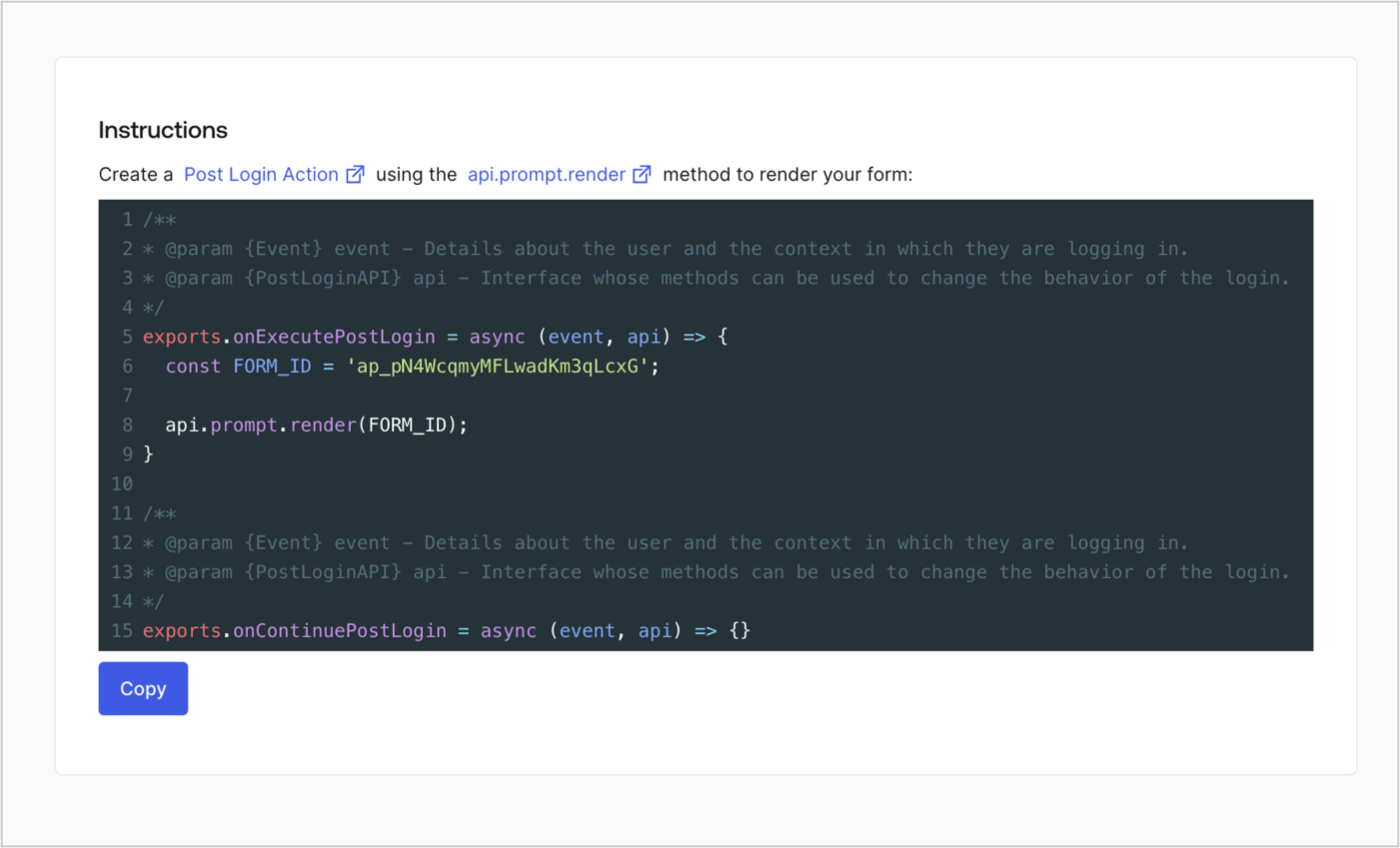
Retrieve your form render code to visually render the form with a custom Post Login Action by following these steps:

* From the Form editor, select **`<> Render`**.
* Select **Copy**.
<Frame>
  <img src="https://mintcdn.com/docs-staging-feat-session-delegation/WOrSho-LlNu8kqb-/docs/images/cdy7uua7fh8z/2EIUzc539sq9lwoTKbjoJv/496a864c0fc44a782c9cadca119dbfb0/embed.png?fit=max&auto=format&n=WOrSho-LlNu8kqb-&q=85&s=5474f0c5dd79e8c078a8bd974cddc06b" alt="Dashboard > Actions > Forms > Form > Embed" data-og-width="1400" width="1400" data-og-height="848" height="848" data-path="docs/images/cdy7uua7fh8z/2EIUzc539sq9lwoTKbjoJv/496a864c0fc44a782c9cadca119dbfb0/embed.png" data-optimize="true" data-opv="3" srcset="https://mintcdn.com/docs-staging-feat-session-delegation/WOrSho-LlNu8kqb-/docs/images/cdy7uua7fh8z/2EIUzc539sq9lwoTKbjoJv/496a864c0fc44a782c9cadca119dbfb0/embed.png?w=280&fit=max&auto=format&n=WOrSho-LlNu8kqb-&q=85&s=bd39b9318cda6fd68b302c35d5cd9178 280w, https://mintcdn.com/docs-staging-feat-session-delegation/WOrSho-LlNu8kqb-/docs/images/cdy7uua7fh8z/2EIUzc539sq9lwoTKbjoJv/496a864c0fc44a782c9cadca119dbfb0/embed.png?w=560&fit=max&auto=format&n=WOrSho-LlNu8kqb-&q=85&s=3a7e82b7eded90afde5cc8cbefd576c7 560w, https://mintcdn.com/docs-staging-feat-session-delegation/WOrSho-LlNu8kqb-/docs/images/cdy7uua7fh8z/2EIUzc539sq9lwoTKbjoJv/496a864c0fc44a782c9cadca119dbfb0/embed.png?w=840&fit=max&auto=format&n=WOrSho-LlNu8kqb-&q=85&s=ef0679fe5cbad42562047f2489b0cb05 840w, https://mintcdn.com/docs-staging-feat-session-delegation/WOrSho-LlNu8kqb-/docs/images/cdy7uua7fh8z/2EIUzc539sq9lwoTKbjoJv/496a864c0fc44a782c9cadca119dbfb0/embed.png?w=1100&fit=max&auto=format&n=WOrSho-LlNu8kqb-&q=85&s=17062b8b6a3e03957ff7ce676dd5ef9f 1100w, https://mintcdn.com/docs-staging-feat-session-delegation/WOrSho-LlNu8kqb-/docs/images/cdy7uua7fh8z/2EIUzc539sq9lwoTKbjoJv/496a864c0fc44a782c9cadca119dbfb0/embed.png?w=1650&fit=max&auto=format&n=WOrSho-LlNu8kqb-&q=85&s=d262eb7508c72c6a44846b1a647ab99c 1650w, https://mintcdn.com/docs-staging-feat-session-delegation/WOrSho-LlNu8kqb-/docs/images/cdy7uua7fh8z/2EIUzc539sq9lwoTKbjoJv/496a864c0fc44a782c9cadca119dbfb0/embed.png?w=2500&fit=max&auto=format&n=WOrSho-LlNu8kqb-&q=85&s=10053a35feca6ca999da7e5ae0d145d0 2500w" />
</Frame>

## Create a Post Login Action

Create a post-login Action to render your form by following these steps:

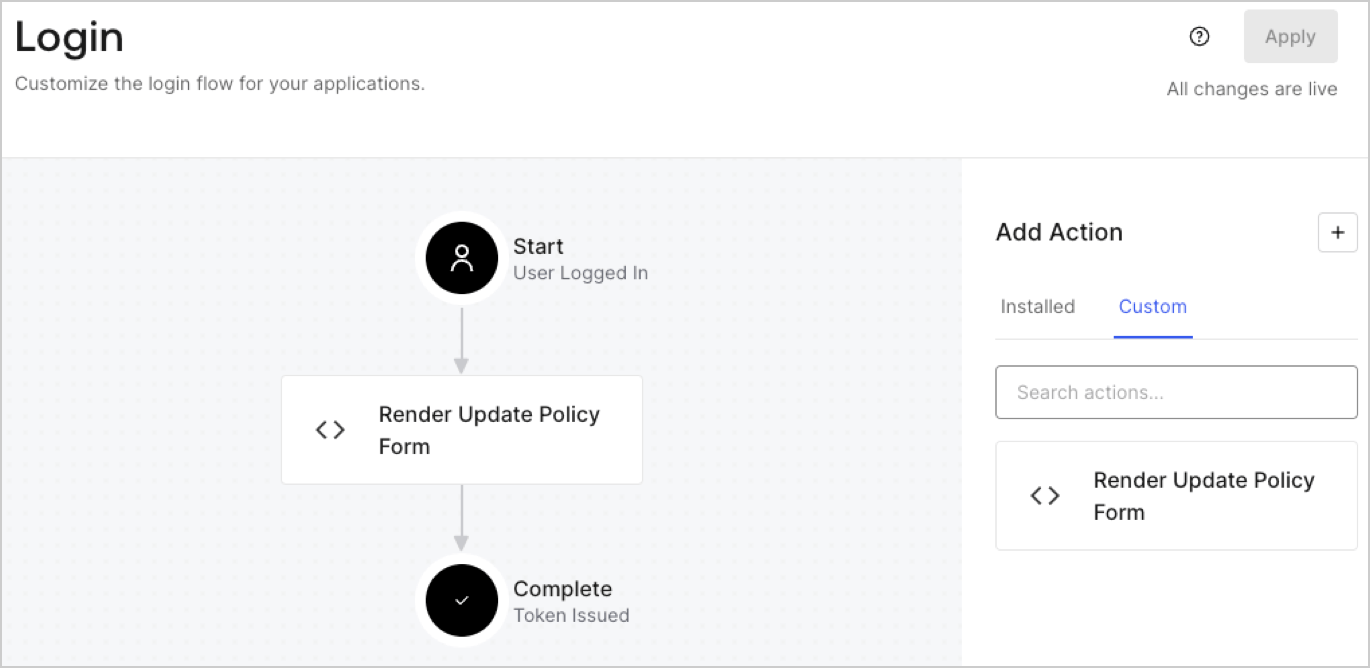
1. Navigate to **Auth0 Dashboard > Actions > Flows > Login.**
2. Select the **+** icon and Select **Build from scratch**:

   * **Name**: Enter `Render Update Policy Form`.
   * **Trigger**: Select `Login / Post Login`.
   * **Runtime**: Select the recommended version.
3. Select **Create**.

To configure the post-login Action:

1. Delete the existing code from the Code editor.
2. Paste the form render code into the Code editor.
3. Edit the code to define the conditional logic that will render the form.

   ```javascript lines theme={null}
   /**
   * @param {Event} event - Details about the user and the context in which they are logging in.
   * @param {PostLoginAPI} api - Interface whose methods can be used to change the behavior of the login.
   */
   exports.onExecutePostLogin = async (event, api) => {
     const FORM_ID = 'REPLACE_WITH_YOUR_FORM_ID';

     if (event.user.app_metadata.privacy_policies !== true) {
       api.prompt.render(FORM_ID);
     }
   }

   exports.onContinuePostLogin = async (event, api) => { }
   ```

   <Callout icon="file-lines" color="#0EA5E9" iconType="regular">
     The example code above will render the form when a user is missing the app metadata `privacy_policies` property.
   </Callout>
4. Select **Deploy.**
5. Drag and Drop the **Render Update Policy Form** Action to the **Login** flow.
   <Frame>
     <img src="https://mintcdn.com/docs-staging-feat-session-delegation/LlSY2w1H1T7G78aC/docs/images/cdy7uua7fh8z/5TOwDgevZsBqd7yZynUYWU/41ca909dc3007aed4f40ff794a05efa5/postlogin.png?fit=max&auto=format&n=LlSY2w1H1T7G78aC&q=85&s=8b050958cb5dc291bd62eba3ff84bf05" alt="Dashboard > Forms > Use Case > Render update policy form login action" data-og-width="1370" width="1370" data-og-height="668" height="668" data-path="docs/images/cdy7uua7fh8z/5TOwDgevZsBqd7yZynUYWU/41ca909dc3007aed4f40ff794a05efa5/postlogin.png" data-optimize="true" data-opv="3" srcset="https://mintcdn.com/docs-staging-feat-session-delegation/LlSY2w1H1T7G78aC/docs/images/cdy7uua7fh8z/5TOwDgevZsBqd7yZynUYWU/41ca909dc3007aed4f40ff794a05efa5/postlogin.png?w=280&fit=max&auto=format&n=LlSY2w1H1T7G78aC&q=85&s=6a4585dff6e5882159733a79b5fcc1e5 280w, https://mintcdn.com/docs-staging-feat-session-delegation/LlSY2w1H1T7G78aC/docs/images/cdy7uua7fh8z/5TOwDgevZsBqd7yZynUYWU/41ca909dc3007aed4f40ff794a05efa5/postlogin.png?w=560&fit=max&auto=format&n=LlSY2w1H1T7G78aC&q=85&s=164ac05f748f6684b318d45ddf174f9c 560w, https://mintcdn.com/docs-staging-feat-session-delegation/LlSY2w1H1T7G78aC/docs/images/cdy7uua7fh8z/5TOwDgevZsBqd7yZynUYWU/41ca909dc3007aed4f40ff794a05efa5/postlogin.png?w=840&fit=max&auto=format&n=LlSY2w1H1T7G78aC&q=85&s=0cf3c7e1e1d799135b192823eb51b05e 840w, https://mintcdn.com/docs-staging-feat-session-delegation/LlSY2w1H1T7G78aC/docs/images/cdy7uua7fh8z/5TOwDgevZsBqd7yZynUYWU/41ca909dc3007aed4f40ff794a05efa5/postlogin.png?w=1100&fit=max&auto=format&n=LlSY2w1H1T7G78aC&q=85&s=9485a0ddd328f39fb305b2cc52ee423c 1100w, https://mintcdn.com/docs-staging-feat-session-delegation/LlSY2w1H1T7G78aC/docs/images/cdy7uua7fh8z/5TOwDgevZsBqd7yZynUYWU/41ca909dc3007aed4f40ff794a05efa5/postlogin.png?w=1650&fit=max&auto=format&n=LlSY2w1H1T7G78aC&q=85&s=ee6560273e02b9466861e2cc4a41d20d 1650w, https://mintcdn.com/docs-staging-feat-session-delegation/LlSY2w1H1T7G78aC/docs/images/cdy7uua7fh8z/5TOwDgevZsBqd7yZynUYWU/41ca909dc3007aed4f40ff794a05efa5/postlogin.png?w=2500&fit=max&auto=format&n=LlSY2w1H1T7G78aC&q=85&s=c7aeb0b4394e0a4e1090050a5330ce71 2500w" />
   </Frame>
6. Select **Apply.**

### Test implementation

Test the implementation by following these steps:

1. Log in with an existing user whose app`_metadata` attribute `privacy_policies` does not have a value.
2. The post-login Action in the Login flow will render the form and prompt for acceptance.
3. Select **Auth0 Dashboard > User Management > Users,** locate the user and verify that the `app_metadata` attribute `privacy_policies` contains a `true` value and a timestamp.
